

[ 01 // ai triage ]
Every ticket read,
triaged and researched.
When a ticket lands in HaloPSA, QuantumOps reads it, drafts the triage with its reasoning, gets a second opinion on the analysis and researches the fix. Then a person dispatches it.
 #54892 · VPN drops every 20 minutes
[ 02 // the pipeline ]
What happens when a ticket lands.
HaloPSA tells your QuantumOps instance about every new ticket, update, customer email and closure as it happens. No polling, no exports. The work runs in the background, and the screens fill in as each stage finishes.
01
Halo calls your instance
A webhook goes to your own QuantumOps instance, and anything without a valid HMAC-SHA256 signature is turned away. QuantumOps answers Halo straight away and does the work in the background.
02
Q-Director drafts the triage
It gathers the ticket and its actions, the teams and types you allow, possible duplicates, live workload, similar memories and the client and user profiles, then drafts the whole triage with its reasoning.
03
The analysis gets a second opinion
The main model writes the summary, the key issue and a suggested priority, and checks the ticket type and category. A second model reads the ticket again, and a Sanity score shows how far they agree.
04
Sherlock researches the fix
Similar past tickets, your team’s memories, the web and, once you switch it on, your ITGlue, Hudu and SharePoint documentation, boiled down to likely root causes and a recommended fix.
05
Paths and checks are ready
Three to five ways to resolve the ticket, step by step, plus sentiment, tonality, health and stale checks. The ticket is indexed and its key facts saved, so the next similar ticket can find them.
06
A person decides
The recommendation waits on the Triage tab and in the side panel. Nothing is dispatched, merged or closed until someone presses the button.
Each ticket gets a 15-minute processing budget, and with Triage Assist on, a catch-up job every three minutes re-runs open tickets whose analysis or research didn’t finish. You see the results inside HaloPSA on the Ticket Analysis, Ticket Triage and Agent Assist tabs, on the QA Pipeline screen in the web app, and in the QuantumOps for Halo side panel.
[ 03 // q-director ]
Q-Director drafts.
A person dispatches.
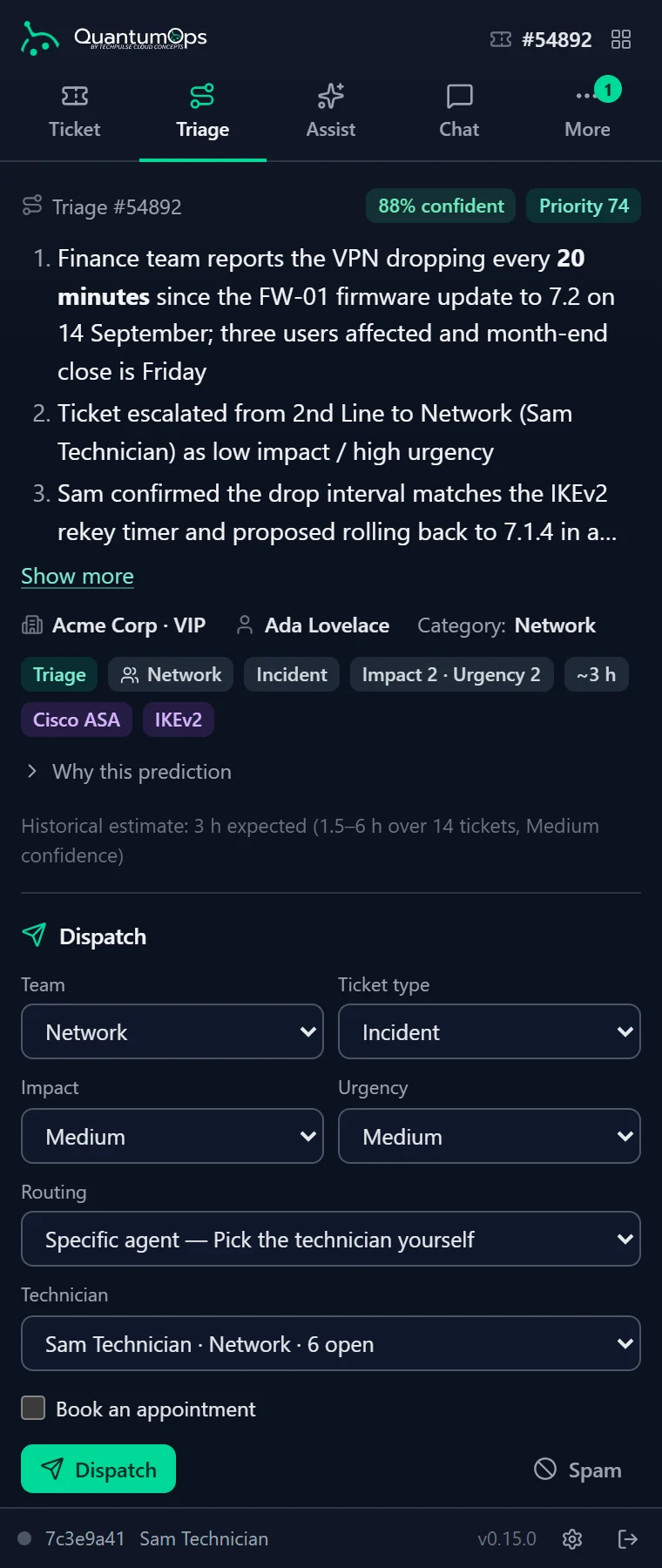
Q-Director Triage Assist prepares the whole triage before anyone opens the ticket. A dispatcher reads it, changes what they disagree with and presses Dispatch. Q-Director never assigns a ticket on its own.
What the draft covers
- Team and ticket type, from the ones you open to triage
- Impact and urgency, which Halo turns into the priority
- Routing: load balance, round robin or intelligent through Halo’s own routing, or a specific agent
- A technician, ranked by fit, and the skills the ticket needs
- An appointment slot and length, if you switch on scheduling in triage
- Or a different call: merge into a duplicate, or close as spam
Team, type, impact, urgency and routing each have a Why? with the reasoning, and the draft carries a confidence figure: the triage model’s own estimate, lowered when a missing team or type had to be filled in automatically. The form is always there. While the AI is still working it says so, and if the AI is unavailable it becomes a Manual Dispatch form.
Dispatch
Team, type, impact, urgency and agent go to Halo, with a private Q-Director note naming the routing and the dispatcher.
Merge
Fold the ticket into its duplicate. Halo gets a merge note, and the decision is recorded.
Close as spam
Marks the ticket as spam and blocks more email from the sender, after a warning that it can’t be undone.
Schedule
Book the ticket with an agent, tentative or firm, from their free slots when appointment scheduling is on.
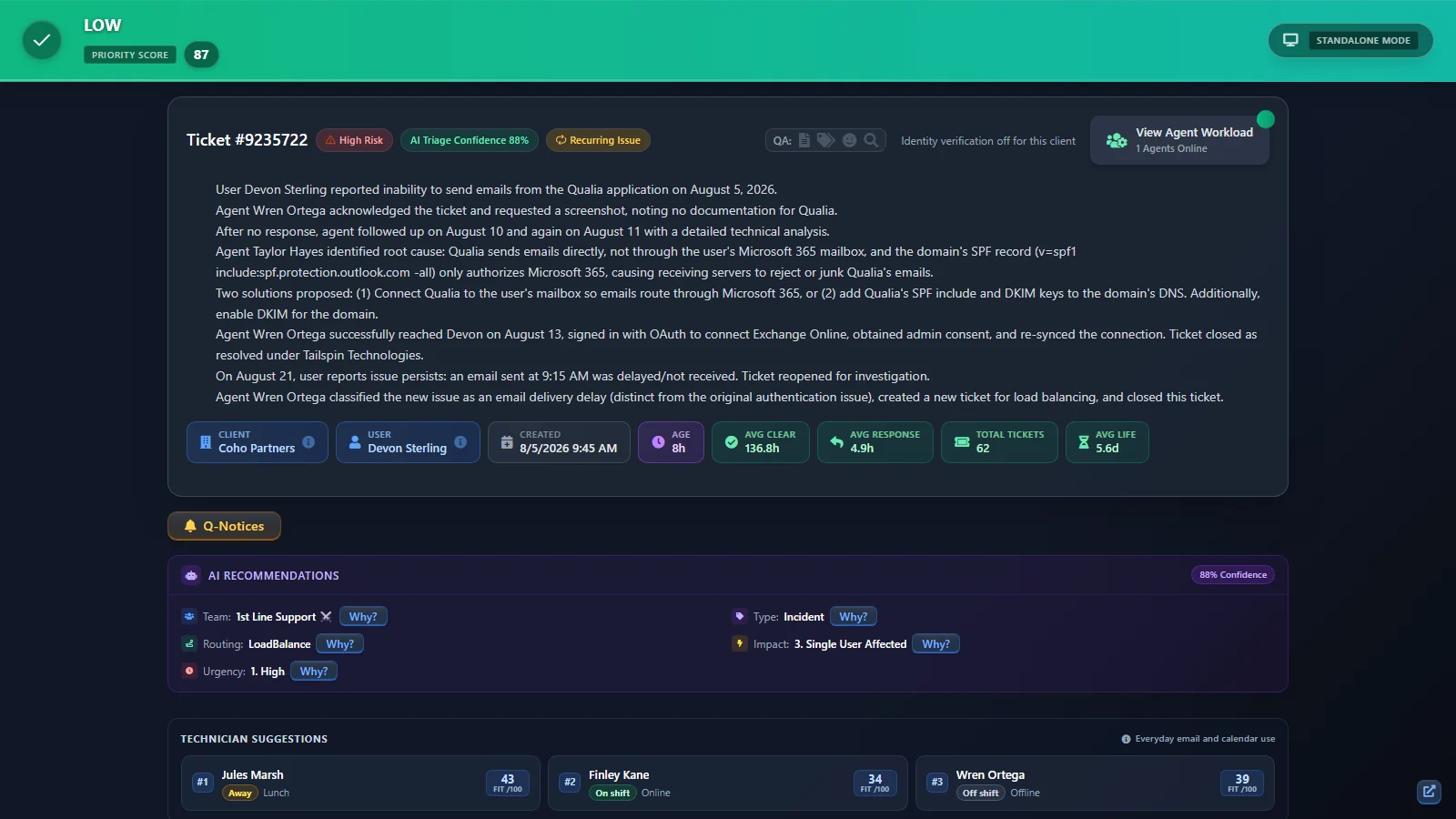
Overrides are kept. When a dispatcher changes the team, type, impact or urgency, QuantumOps stores the AI’s version next to theirs. On the Dispatcher Override Review page, a manager approves or rejects each correction. Every six hours, approved corrections that keep pointing the same way are folded into your tenant’s memory, where later AI prompts can find them. No model is retrained.
Taking a call? On the Call Taking screen, Q-Director drafts the triage from the call notes before the ticket exists. Phones and identity
[ 04 // technician fit ]
The right tech, not just the free one.
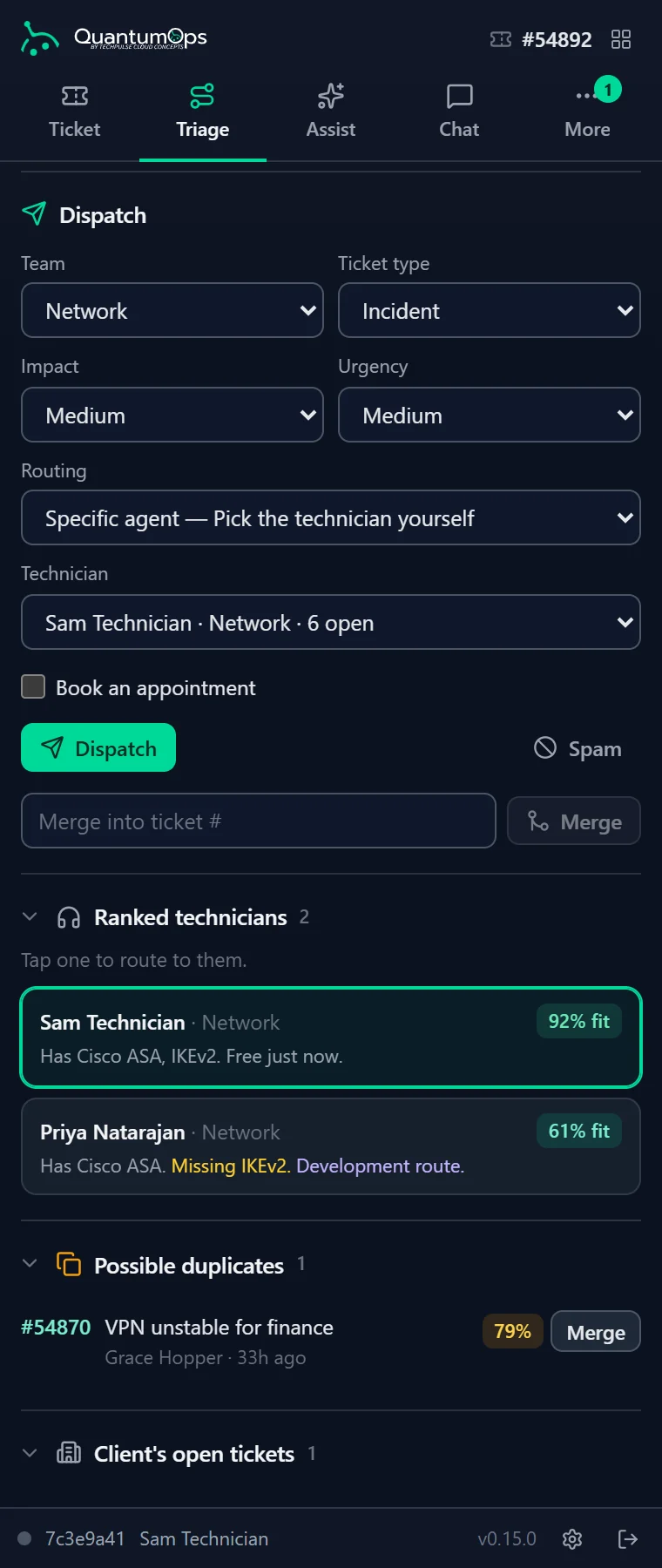
Every candidate in the recommended team gets a fit score out of 100. It is a weighted formula, and your admins set how much each factor counts.
Live capacity
Their open tickets in Halo, from a workload count at most 15 minutes old.
Skills
A match against the skills Q-Director says the ticket needs, once you switch on skill-based routing and set up agent skills. Until then everyone scores the same here.
Client familiarity
How often they’ve worked this client before.
Burnout safety
Their burnout risk from the Agent Performance Hub, so the next ticket doesn’t land on someone already running hot.
Quality fit
Their interaction quality, clarity, empathy and professionalism scores.
Schedule
Their scheduled availability. Techs who aren’t on shift drop down the list and are flagged.
Development fit
With skill-based routing on, a stretch ticket for someone closing a known skill gap. Never on a breached or critical ticket.
The top three show on the Halo Triage tab, each marked On shift, Away or Off shift. The side panel lists every ranked tech with matched and missing skills. The same ranking feeds the Call Taking ticket form and the dispatch board.
[ 05 // duplicates and patterns ]
Checked against what’s already open.
During triage, QuantumOps looks for possible duplicates and repeat problems, and scores how far the ticket should jump the queue.
Possible duplicates
The new ticket is compared by meaning with indexed tickets from the last 90 days: by default open tickets at the same client, or the same user or all your clients if you prefer. Matches above your threshold (90% by default) or with a near-identical summary show their match percentage with View and Merge, and merging leaves a note in Halo.
Recurring patterns
Tickets with the same Halo category or resolution category in the last 30 days are counted for the same user, the same client and all your clients. Past a threshold (by default 2, 3 and 5), the ticket is marked Recurring Issue and the matching tickets are listed so you can open them.
Priority score
One number from 1 to 100, lower is more urgent. It weighs sentiment and tonality alerts (25%), client risk and VIP status (20%), a stand-in for SLA pressure built from health and age (20%), recurring issues (15%), age (10%) and the user’s history (10%). A fixed formula, not machine learning, worked out once when the ticket is triaged.
Historical time estimates
Turn on historical estimation (it comes on with the dispatcher workflow) and QuantumOps says how long tickets like this one really took, for example “3 h expected (1.5–6 h over 14 tickets, Medium confidence)”. When history is thin it shows the AI’s own estimate or your default, labeled Fallback.
[ 06 // the second opinion ]
Each new analysis gets a second opinion.
A second model reads each new ticket on its own. QuantumOps compares the two readings in code and gives the analysis a Sanity score out of 100.
What gets compared
- Service type: a mismatch costs 20 points
- Category verdict, whether the Halo category is right: a mismatch costs 20
- Summary overlap: moderate costs 5, weak costs 10
- Tonality overlap: the same again, for how the customer is writing
No third AI call grades the result. Low scores are the analyses a person should look at first, and the QA Pipeline shows a 30-day average as Healthy, Moderate or Needs Review. When the ticket is updated later, the quick refresh re-estimates the score with the fast model, so on an active ticket the number can be that one model’s estimate.
You choose the second model. By default it is your fast Claude model; on your own keys it can come from another provider, such as OpenAI.
What the score isn’t. It measures how closely two readings agree, not whether either one is right, and it checks the ticket analysis, not Q-Director‘s triage. One model makes each triage recommendation, and its confidence is that model’s own estimate.
[ 07 // sherlock ]
Sherlock researches every ticket.
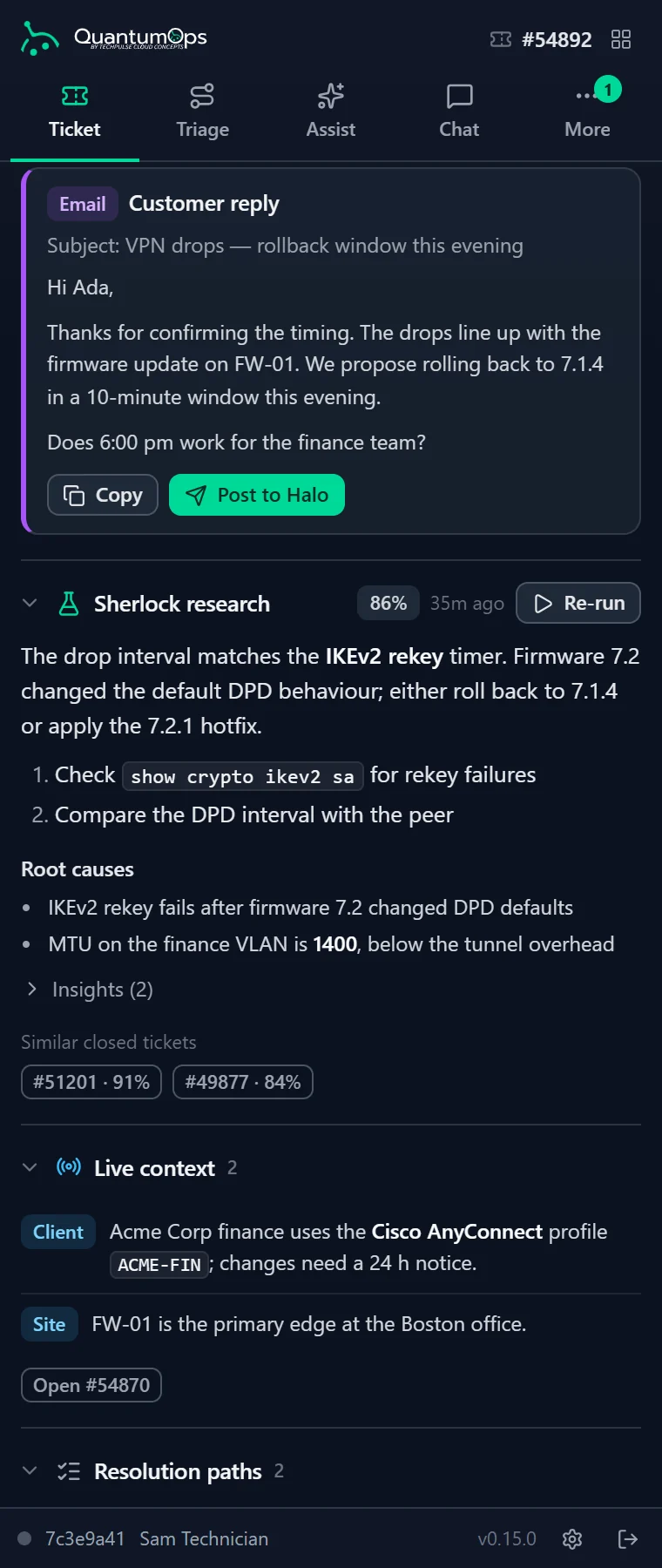
After the analysis, Sherlock goes looking for the fix, so the tech starts from a recommendation instead of a search box.
Where Sherlock looks
- Your most similar past tickets, found by meaning and by matching search terms
- What your team already knows: memories and client and user profiles
- The client’s ITGlue, Hudu and SharePoint documentation, once documentation search is switched on
- The web, for vendor advisories and known bugs, through Tavily or Anthropic web search with allowed and blocked domains
- Then a read-only research run that can look things up live in HaloPSA and in the tool sources you connect, steered by an effort level and the token and time budgets you set
The result is a recommended solution, likely root causes and similar resolved tickets. Techs can rate each root cause and, once verified, turn the recommended fix into a reply draft. Switch it on and Sherlock also posts a private note to the Halo ticket that the end user never sees: by default once, and again only when its findings change.
Investigate, on demand
When a ticket is hard, a tech clicks Investigate, adds their own question if they like (“why does the VPN drop after sleep?”), and watches Sherlock plan, pull similar incidents, search the web and write up findings. Each run has a fixed budget and a per-ticket cooldown.
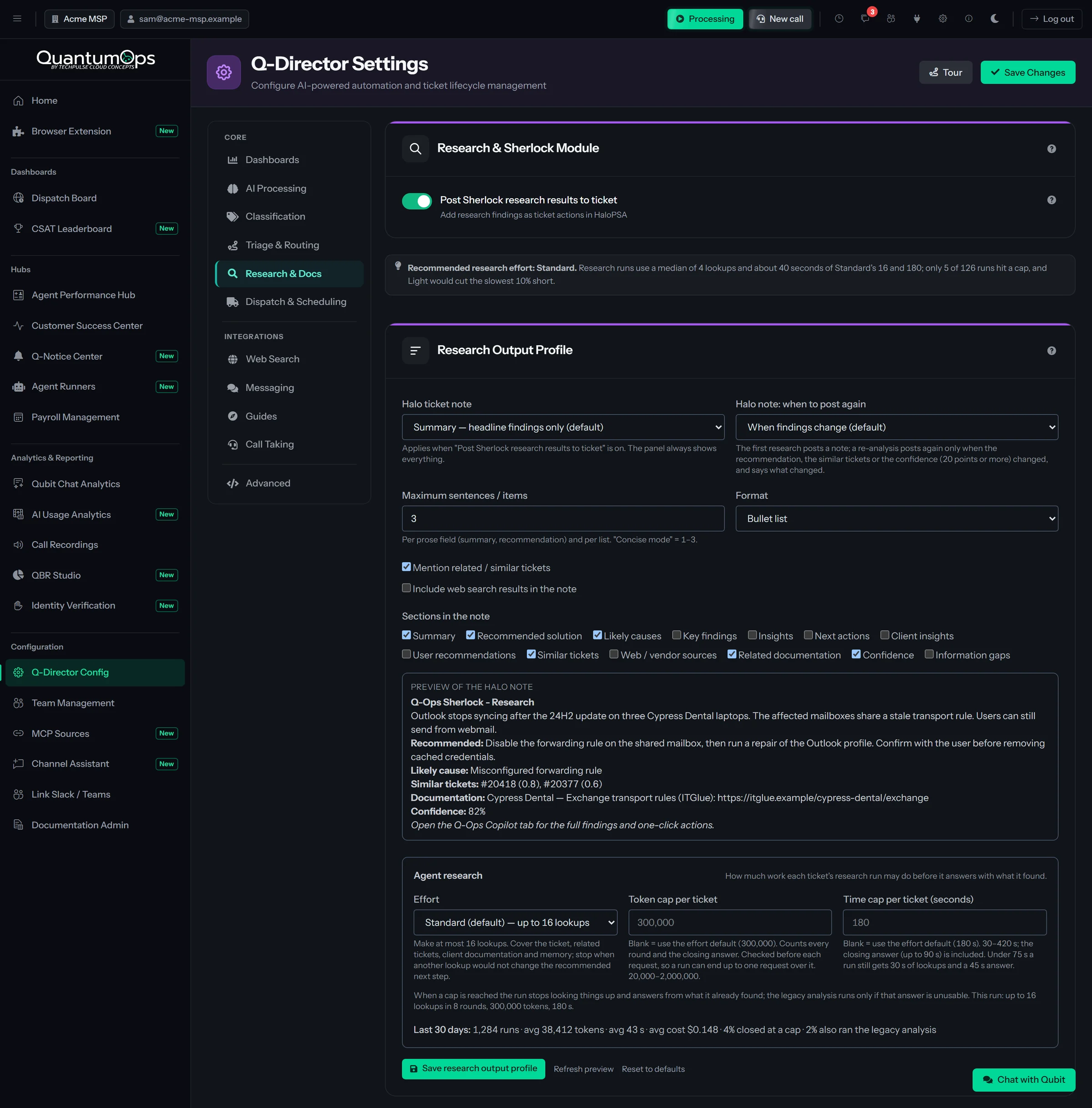
Research Output Profile
When posting to Halo is on, decide what Sherlock writes there: nothing, a headline summary or the full findings, as bullets or a short narrative, capped at 1 to 12 items, with a live preview, and whether it posts again when the findings change. The full findings stay in QuantumOps either way. The same card sets the research budget: an effort level from Light to Exhaustive, and a token and time budget per ticket. Both are checked between steps, so a run finishes the step it is on and still writes its answer. It also shows the last 30 days of runs with their average cost.
[ 08 // interactive guide ]
A guided fix, with the reply already drafted.
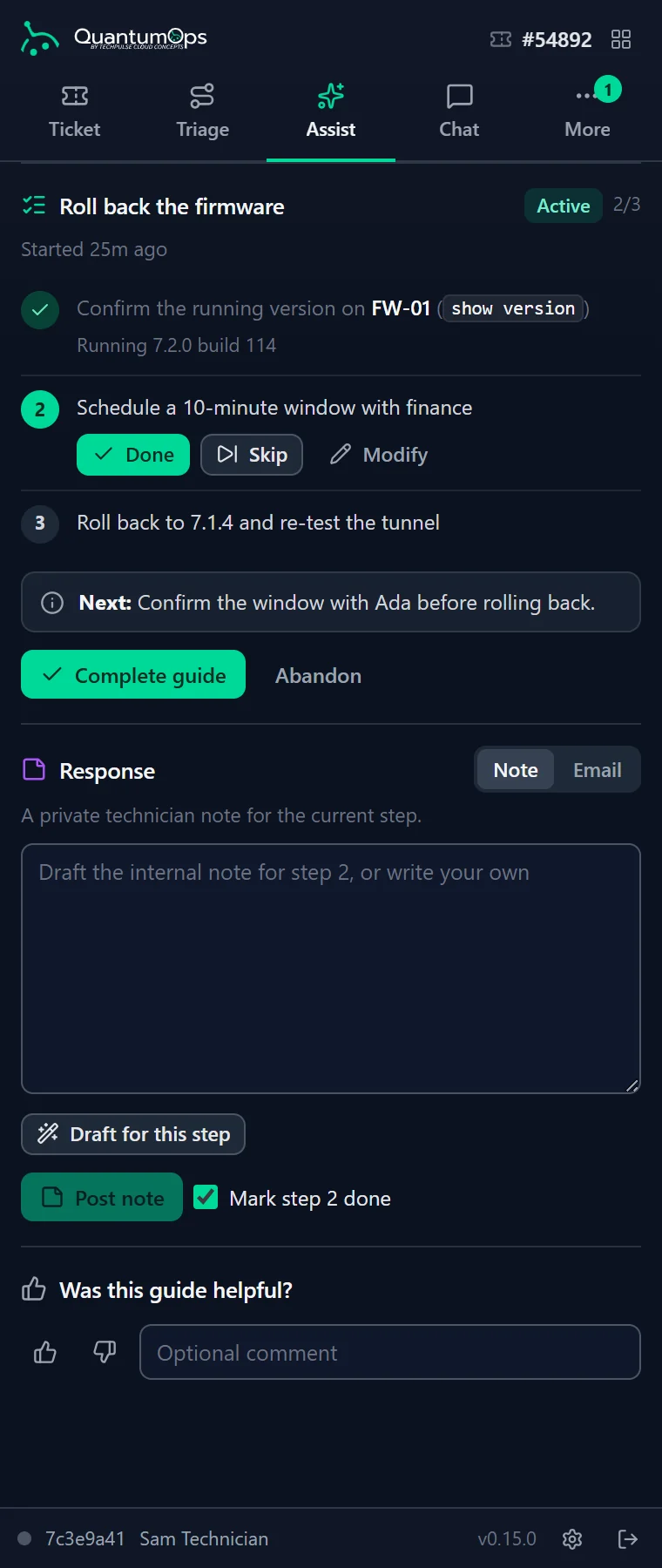
The Agent Assist tab (the Interactive Guide) offers three to five ways to resolve the ticket, marks the one it recommends, and walks the tech through it step by step.
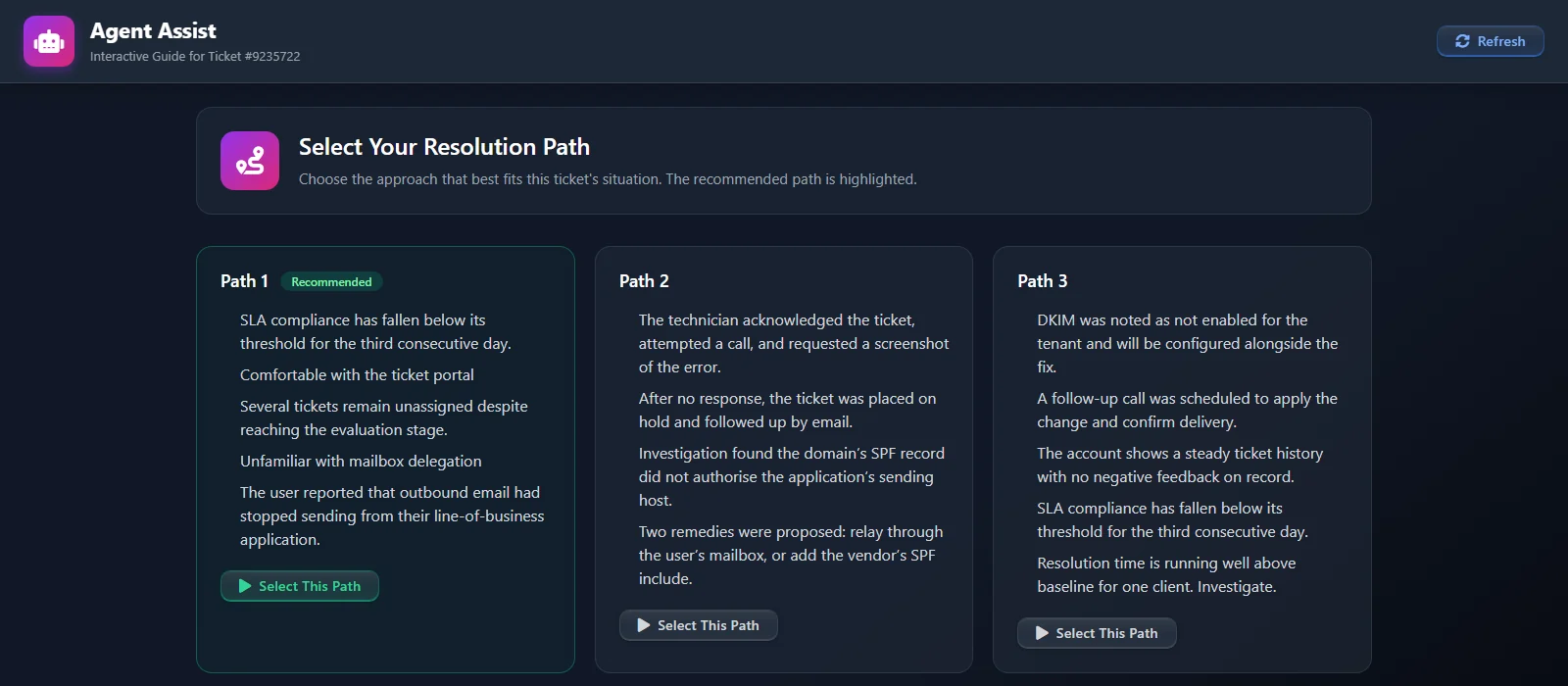
Pick a path, or write your own
Each path lists its steps before you commit. Create Custom Approach turns the tech’s own plan into steps. Complete, skip or change path as the work goes, and the paths update as the ticket changes.
Draft as you go
At any step, draft the customer email or the internal note, refine it in plain English (“make it more empathetic”, “add the ETA”), review it and send it to the Halo ticket. From the Halo tab it posts as the ticket’s assigned agent; from the side panel, as the tech.
Admins can rehearse the guide on a mock or existing ticket in the simulator under Q-Director Config.
[ 09 // suggested actions ]
The Copilot proposes.
A verified tech approves.
On the Ticket Analysis tab in Halo and the side panel’s Ticket tab, the Qubit Copilot turns what the pipeline found into next steps.
What it suggests today
- A reply draft, written from the research, your memories and similar resolutions, with numbered sources
- An internal escalation note when sentiment or tonality raises an alert
- An internal nudge note when the ticket goes stale
- A merge when duplicate detection finds a match
- A Resolution Replay: the steps that fixed a similar closed ticket, offered only when one qualifies
- A short KB draft note when a researched ticket closes
Each card says why it was suggested and exactly what it will do. Anyone with the tab open can read the suggestions. To act on one in Halo, once an admin has issued the tab key, a technician verifies with a one-time code emailed to the address on their Halo agent record. In the side panel, signing in with a linked Halo agent covers it. Every change is written to Halo under their name.
Reply drafts follow your communication policy: tone, style guide, banned phrases, required disclaimers and signature. Send stays blocked while a draft contains a banned phrase or is missing a required disclaimer, and the server checks again before posting.
Qubit CopilotVerified techRules pick the suggestions from what the pipeline already found. The AI writes the words, such as the reply draft and the replay steps, and never decides to act. Every approve, edit and reject is recorded. Qubit and approvals
[ 10 // after triage ]
The analysis keeps up with the ticket.
Triage is one moment. QuantumOps keeps reading as the customer replies and the ticket ages.
Sentiment and tonality
Each customer email is scored 1 to 10 for how the customer feels and, separately, how they are saying it, with key phrases and a trend. When either falls to your alert threshold (5 by default, which you can shift by two points for a particular client or contact), a card with the scores goes to your Slack or Teams channel, at most once every four hours per ticket. Leave out ticket types or clients.
Stale tickets, explained
Rules you set (days without an agent action, overdue follow-ups, time unassigned or on SLA hold) flag tickets that have gone quiet. For each one, the AI says why it stalled and how to get it moving.
Context the AI reads
Raise a Q-Notice from the ticket (“client migrating this weekend”, “don’t reboot that server”). Notices marked for the AI go in front of it every time it analyzes that client’s or user’s tickets.
Categories kept straight
On by default for new tenants: Q-Director sets the Halo category, and the resolution category at closure, with a note each time. It writes only when the category actually changes, creating new categories is optional, and you can switch it off.
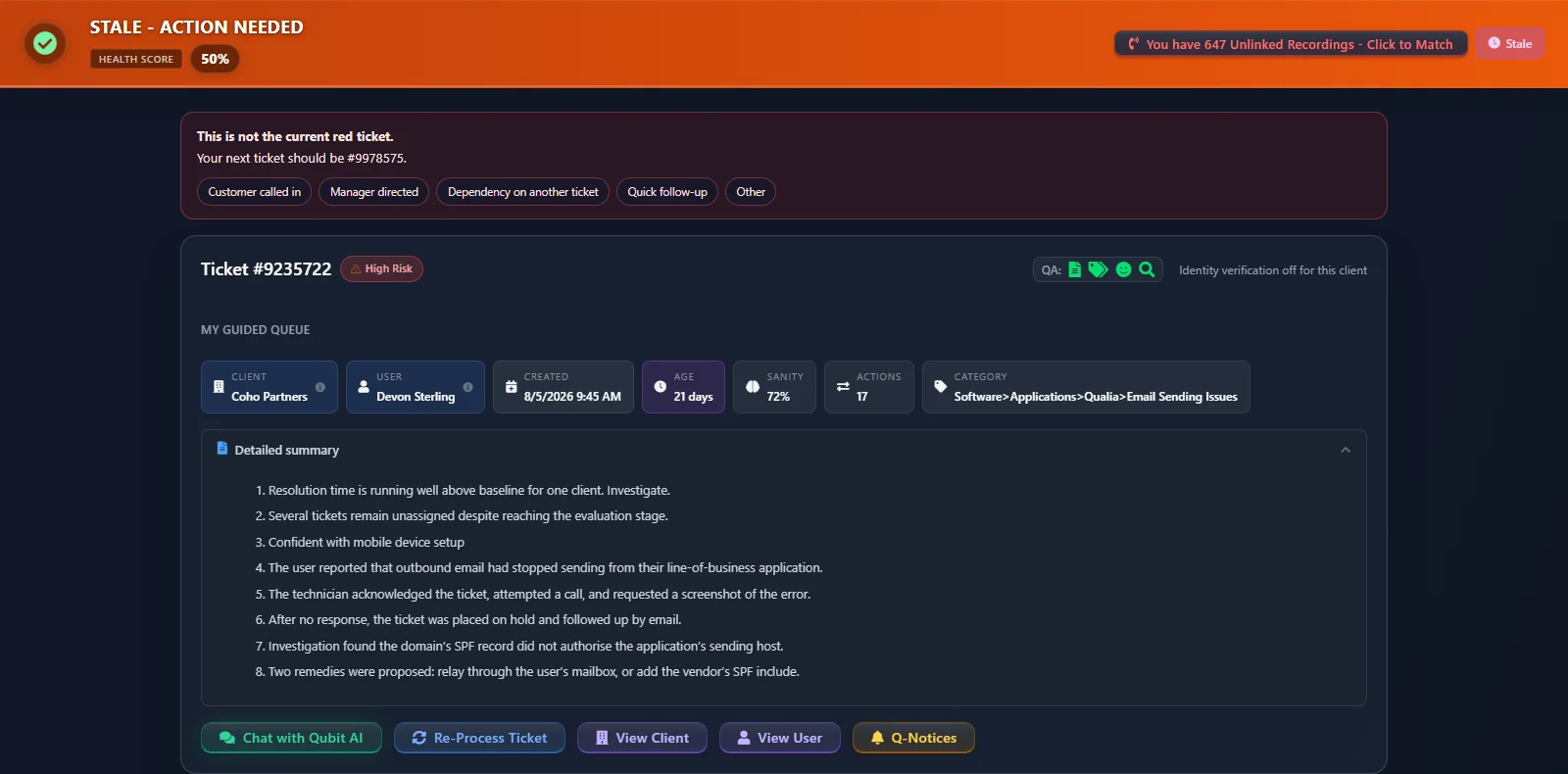
Updates are re-read with one call to a cheaper model. A five-minute gate stops a burst of Halo updates from triggering repeated refreshes, and when a full re-analysis is due it runs instead, so the same update isn’t paid for twice. Ticket types and clients you leave out of AI processing are skipped as their webhooks arrive.
[ 11 // knowledge and memory ]
Built on what your desk already knows.
Every ticket QuantumOps analyzes becomes searchable knowledge about that user, that client and their environment. Nobody tags anything.
Six sources, one search
- Past tickets, found by meaning and keywords together
- Memories: short facts the AI pulls out about users, clients, key people and their setup
- Client profiles and user profiles, written from those memories by an optional nightly job
- Call transcripts, with the call recording module
- ITGlue, Hudu and SharePoint documentation, once an admin switches it on
One search runs across them at once, and a Voyage AI reranker keeps the best 15 results. It grounds the Copilot’s reply drafts and part of Sherlock’s research.
Live Context
The five most relevant memories about this caller and client, plus up to eight of the client’s other open tickets, next to the ticket. On the Halo tab, Useful, Not useful and Outdated change what Live Context shows next time. Outdated takes a fact out of search without deleting it.
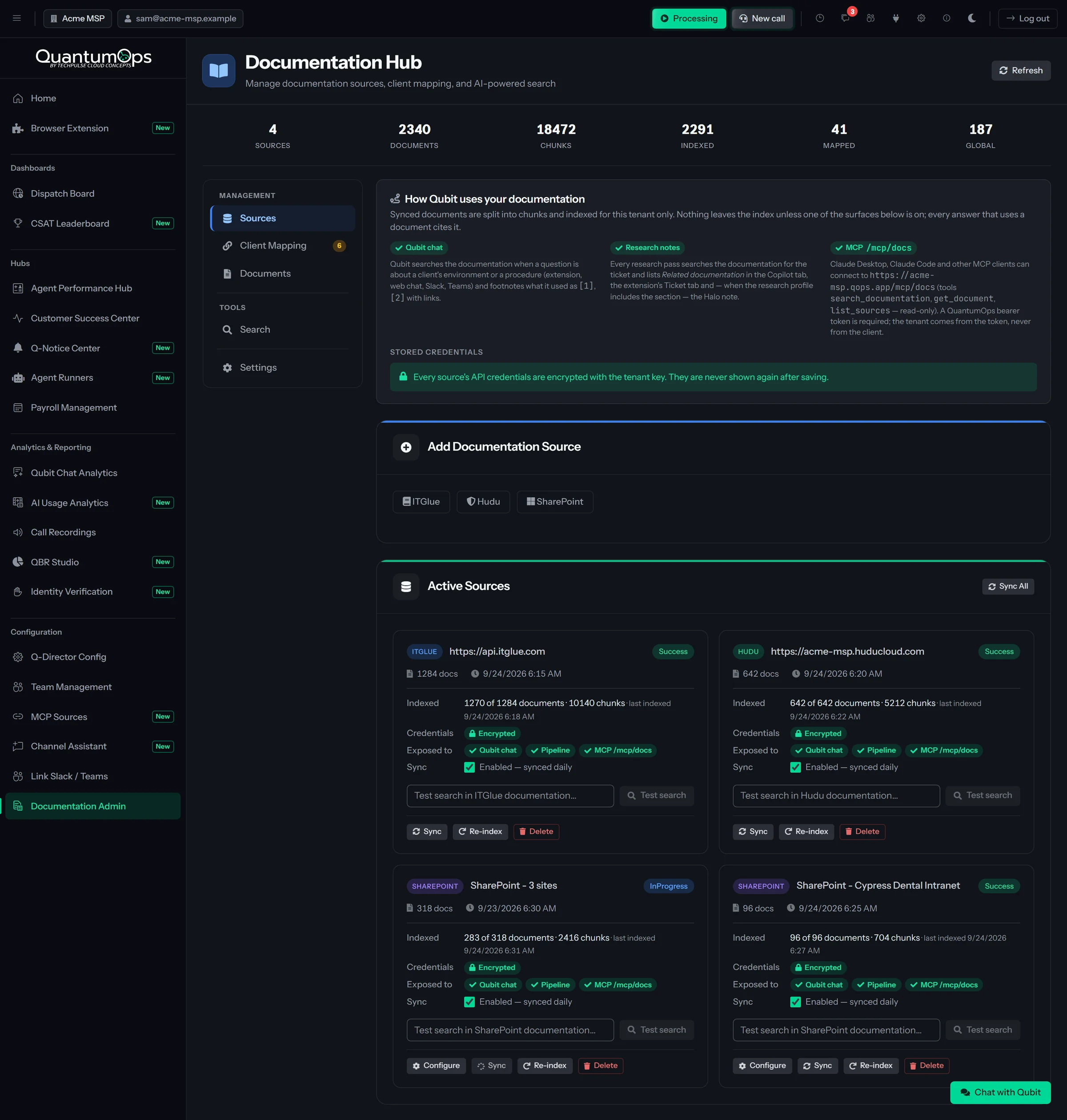
Documentation Hub
Connect ITGlue, Hudu and SharePoint. Sources re-sync every 24 hours and are split into small passages, and common password, key and token patterns are masked in the copy that is indexed and given to the AI.
Initial Data Import
Start from your HaloPSA history, not an empty memory. Pick clients, ticket types, statuses, teams and a date range, see an estimate of the ticket count, AI cost and time, then run it with pause, resume and cancel.
Does Q-Director assign tickets by itself?
No. Q-Director drafts the triage and waits. A dispatcher reviews the pre-filled form on the Triage tab or in the side panel and presses Dispatch, Merge, Close as Spam or Schedule. Halo then works out the priority from the impact and urgency they applied.
Is the triage checked by a second AI?
No, and we don’t claim it is. One model makes each triage recommendation, and its confidence is that model’s own estimate. The second opinion covers the ticket analysis: a second model you choose reads the ticket again, and QuantumOps scores in code how closely the two readings agree.
Does it write anything to Halo without asking?
In a few ways, and each is a setting. Q-Director keeps the Halo category (and the resolution category at closure) current, with a note each time; it is on for new instances and you can switch it off. With call recording, a call matched through a Call Taking session, or by the AI at 90% confidence or more, posts as a call log plus a transcript note hidden from end users, unless you turn auto-post off; other matches wait for a person to post them. With CSAT, each rating posts to the ticket as a note, private by default. Sherlock’s private research note, the guide’s path notes and Guided Work’s ticket colors reach Halo only if you switch them on.
Dispatches, replies, merges and status changes wait for a person, and a tool that changes something asks first unless an admin allows it. From triage, that includes closing as spam, scheduling, guide replies and Copilot actions. On the Halo tabs, anyone who can open the tab can use the dispatch controls, and Copilot actions also need the email-code check. In the side panel, techs sign in and writes go to Halo as their own agent.
Which AI models does it use?
Claude models by default, and each job (analysis, triage, the second opinion and more) has its own model setting. On the AI we manage, you choose among Claude models. On your own keys you can also use OpenAI and Together AI models. See Qubit and approvals for models and cost controls.
Can we keep some tickets away from the AI?
Yes. Leave ticket types or clients out of AI processing, choose which ticket types get triage and stale analysis, and filter noisy actions such as Rule Applied out of the prompt. The type and client exclusions are checked as Halo’s webhooks arrive.
Does it train a model on our tickets?
No. Every analyzed ticket is indexed by meaning with Voyage AI and short facts are pulled out as memories, which Sherlock, Qubit and the Copilot search. No model is fine-tuned on your data. Indexing uses our Voyage AI account even when you bring your own AI keys.
Do our techs need the browser extension?
No. The tabs inside HaloPSA (Ticket Analysis, Ticket Triage and Agent Assist on tickets, plus the Client dashboard) are the live product for every customer, and the setup wizard builds their addresses for you. The QuantumOps for Halo side panel works in Chrome and Edge, with Firefox in beta, and is installed from your own instance while the store listings are pending.
[ 13 // start ]
Watch it triage your own queue.
Book a demo and we’ll walk through QuantumOps on a real HaloPSA queue.