

[ 01 // security ]
Your instance.
Your keys. Your call.
Every MSP gets its own QuantumOps instance and database. Your HaloPSA and AI credentials are encrypted under a key made for your instance alone, and the replies, dispatches, merges and status changes the AI suggests wait for a person on your team.
 yourmsp.qops.appProcessing
 Qubit Copilot suggests
#54892 · Acme Corp · reply draft
Acknowledge and propose a rollback window
- Approves
- A verified technician
- Posts as
- Sam Technician
- Recorded
- Approve, edit or reject
[ 02 // your instance ]
Your own instance, not a seat in a shared app.
Each QuantumOps customer runs in a container of its own, with its own database and its own address. Our control plane provisions, licenses and monitors it, so there is nothing for you to host.
Its own container
Your instance is a container of its own. At startup our control plane hands it the connection to your database, and that is the database it works in.
Its own database
Tickets, AI analysis, settings, history and your encrypted credentials live in a SQL database that belongs to your instance.
Its own address
Your team signs in at your instance’s address, such as yourmsp.qops.app. The Halo tabs are served from it, and the browser extension talks to it.
Shared, but partitioned. A few supporting services serve every instance rather than being copied for each one. The search index keeps each customer in a partition of its own, and the key vault holds a separate key for every instance. Sign-in and our control plane are shared services too.
[ 03 // where your data goes ]
What stays in your instance, and what leaves it.
QuantumOps is an AI product, so ticket text has to reach the services that read it. Here is where it goes, and when.
Stays with your instance
Your database
Tickets, AI analysis, settings, history, credentials and the files shared in Qubit chat, in your instance’s own database on Microsoft Azure in the US.
AI models
The provider doing the job
Ticket text goes to the model that handles each job: on Managed AI, Anthropic Claude on our own account; on your own keys, your Anthropic, OpenAI or Together AI account. Files shared with Qubit go with the question, and when Qubit runs code on Claude, data files are also uploaded to Anthropic’s file storage for the run and deleted after it.
Search
Voyage AI and the search index
Voyage AI turns ticket, documentation and call-transcript text into search vectors and reranks search results. The index lives in a managed vector database (Weaviate Cloud, on Google Cloud in the US), in a partition of its own.
Web research
Your web search provider
When research checks the web, search terms written from the ticket go to Tavily (the default, on our key) or to Anthropic’s web search, whichever an admin picks.
What you connect
Integrations you switch on
Slack, Microsoft Teams, StackJack, other MCP servers, your transcription provider (AssemblyAI, Azure Speech or OpenAI Whisper) and, for caller verification, Microsoft Entra ID get what each job needs, and only after you connect them.
Running the service
Control plane, email and errors
Your instance reports health, AI usage and feedback to our control plane over signed calls. Notification emails go out through our email provider. Errors, logs and performance traces go to Sentry in the US, and can include who was signed in and their IP address.
No data-residency choice. QuantumOps is hosted in the United States, and our privacy policy says data may be transferred to and stored there. The region you pick during setup is your HaloPSA hosting region, not a QuantumOps data location.
[ 04 // your keys ]
Credentials encrypted. Webhooks signed.
The HaloPSA, AI, Slack, Teams, documentation and tool-server credentials listed below are encrypted with AES-256 under a key created for your instance alone and held in Azure Key Vault. A HaloPSA webhook is refused unless it carries a valid signature.
Encrypted with AES-256
HaloPSA
Client ID, client secret and Halo sign-in tokens.
AI providers
Your Anthropic, OpenAI and Together AI keys.
MCP servers
API keys, and each person’s own sign-in tokens.
Documentation sources
The ITGlue, Hudu and SharePoint keys and secrets QuantumOps indexes your docs with, encrypted when the source is saved.
White-label partner links
The secrets that link your instance to a partner MSP’s, for White Label Federation.
Signed and verified
HaloPSA webhooks
Refused unless the Halo-Signature header matches an HMAC-SHA256 of the request body, keyed with your instance’s webhook secret.
Forgeries on the record
A webhook with a bad signature is logged as “Invalid signature” and goes no further.
Calls to our control plane
Signed with your instance’s own key and time-stamped.
HTTPS only
Instances force HTTPS and tell browsers to keep using it.
What this covers, and what it doesn’t. The encryption covers the credentials listed above. Not on that list today: the call-recording module’s storage, transcription and phone-system credentials, and the Teams channel webhook address. A documentation source saved before its keys were encrypted keeps them as they were until it is saved again, or until an administrator presses Protect stored credentials now in the Documentation Hub, which shows a warning until then. Ticket data sits in your instance’s database without separate encryption by QuantumOps. Timeclock PINs are salted and hashed, never stored as the number.
[ 05 // people and roles ]
Know who’s signed in. Know who’s calling.
Everyone on your team signs in through a hosted identity provider with a second factor, and their role decides what they can open. Callers get a check of their own.
A second factor to get in
A new user sets a password and a second factor before they reach the app: an authenticator app, a security key or passkey, or a code by email.
15 roles, server-checked
From Technician to Payroll Accountant, roles decide who opens which dashboards, hubs and admin screens. 20 access policies check them on every protected page and API.
Your team, linked to Halo
Team Management invites people with their roles, imports your Halo agents in bulk and shows who is linked to a Halo agent, so changes land under the right name.
Callers, verified
For clients on Microsoft 365, caller verification checks that the caller controls the account on file, and seals every attempt in a tamper-evident log.
A fixed set of roles. Roles are a fixed set, assigned from Team Management through your identity provider, and a change takes effect at the person’s next sign-in. In the browser extension, the Clock, Call, Recordings, Dispatch, Verification and Approvals tabs follow the same policies. Its ticket, client, user and agent views are open to anyone signed in to your instance.
[ 06 // inside halo ]
The Halo tabs open only where you allow them.
The QuantumOps tabs you add to HaloPSA tickets and clients can only be framed by your Halo site and origins added for your instance. Approving what the Qubit Copilot suggests takes one more step: proving who you are.
- Only your Halo site, your instance’s own address and origins added for your instance can frame the tabs. A direct visit in a browser gets Access Denied.
- Without the tab key an admin generates, the Copilot panels are view-only for everyone. The key is stored only as a hash, shown once, and can be rotated or revoked.
- Approving a Copilot suggestion needs a technician verified by a one-time code sent to the email on their Halo agent record. A verified device is remembered for 90 days.
- Each approved Copilot change is written to Halo under that technician’s name, taken from a signed token rather than the URL.
- The communication policy can’t be edited from inside a tab, even by an admin.
The frame lock isn’t a login: anyone who can open a tab in your Halo can read it. The older controls on the tabs, such as the Triage tab’s dispatch, merge and close as spam, Agent Assist replies and raising a Q-Notice, don’t ask for verification either. They are credited to the agent that Halo names in the tab address, or to the ticket’s assigned agent.
Suggested actionsView onlyVerify your agent identity
We sent a code to the email on your Halo agent record.
- Code valid
- 10 minutes
- Attempts
- 5
- Device
- Kept 90 days
- Posts as
- Sam Technician
[ 07 // ai tools and approvals ]
Reads run. Changes ask.
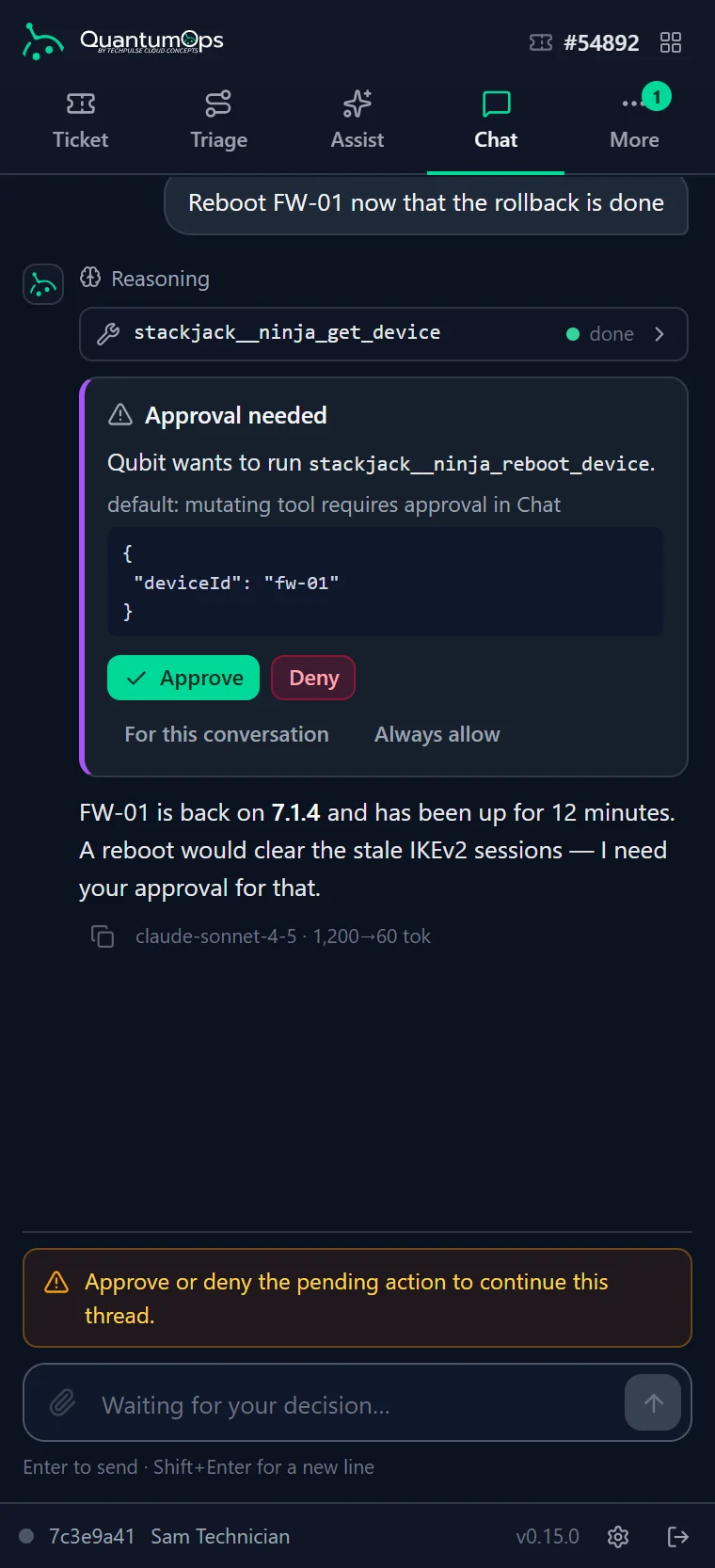
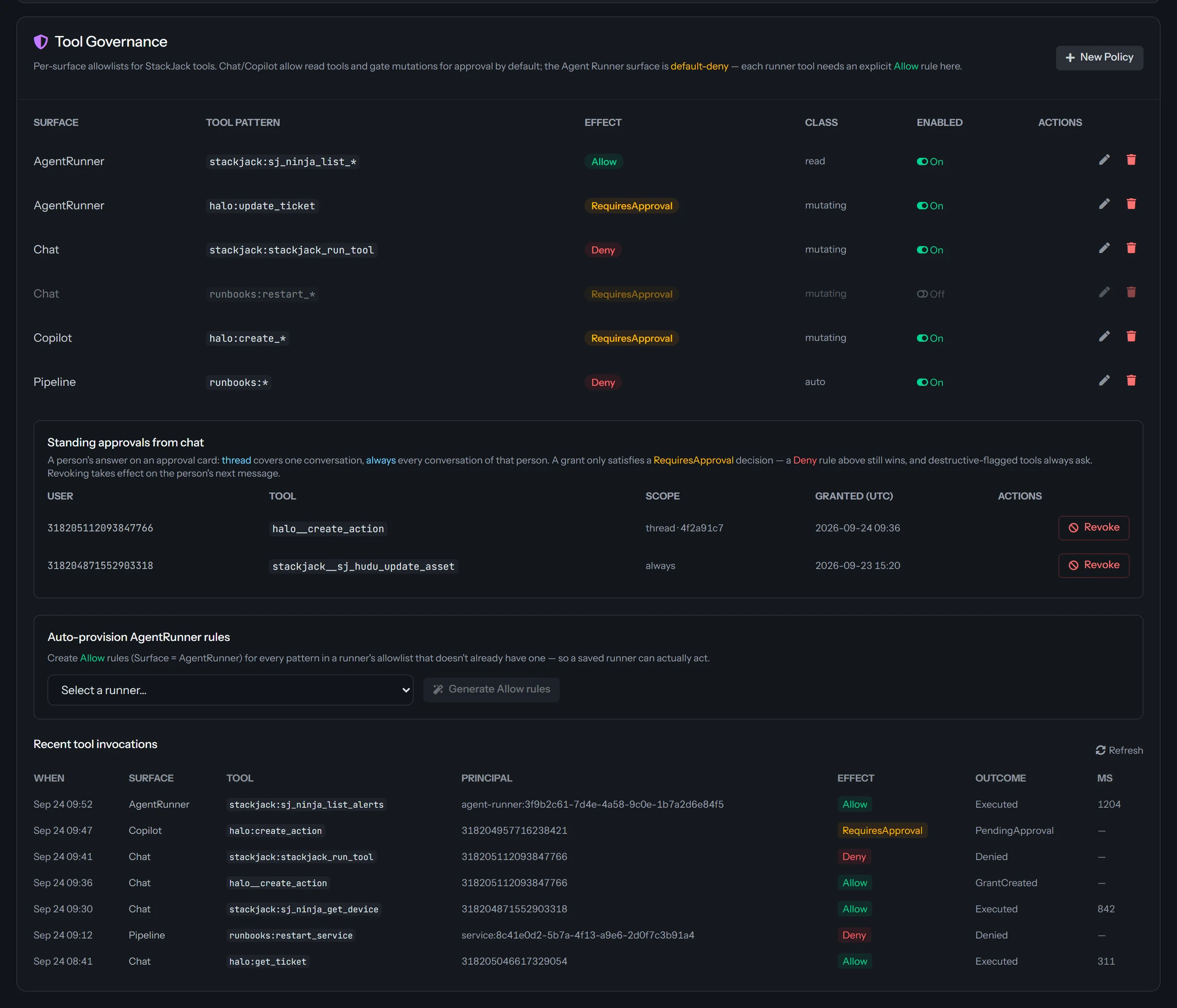
When Qubit or an Agent Runner reaches for a tool, whether HaloPSA, StackJack or any MCP server you connect, one policy gate decides whether it runs, asks first or never runs.
Changes stop for a yes
With no rule set, reads run and changes wait for an Approve or Deny that shows the exact tool and its arguments. In Slack and Teams, only the person who asked can approve.
Nothing unattended by default
Agent Runners start from deny-all. In the automatic pipeline, nobody is there to approve, so a change is denied unless an admin allows that tool. “Always allow” and “For this conversation” work only in chat, and by default never for tools marked destructive.
Audited, without the payload
Each governed call is logged with the tool, who asked, the surface, the rule’s effect and the outcome. Argument values are kept only as a hash.
No way around the gate. A third-party MCP server can’t skip approval by labeling its own tool read-only, and a tool that can’t be classified is treated as a change. Halo changes requested by outside AI clients such as Claude Desktop wait for an administrator, and are applied once, with a note on the ticket saying who asked and who approved.
[ 08 // the extension ]
A side panel that reads the address bar, not the page.
QuantumOps for Halo, for Chrome and Edge with Firefox in beta, learns which ticket, client, user or agent is open from the Halo page address alone.
- Never reads Halo’s page content or cookies, and never changes the page.
- Signs in with OAuth 2.0 and PKCE in the browser’s own sign-in window, so it never sees a password.
- Keeps its sign-in tokens in the browser’s memory-only storage, cleared when the browser restarts.
- Sends data only to your QuantumOps instance and your sign-in provider. No analytics, no remote code.
- Read-only until the tech is linked to their Halo agent. Every change lands in Halo under their name, after a confirmation.
It doesn’t ask for access to all sites: a custom Halo domain is granted one origin at a time. The code is minified, not obfuscated, so your reviewers can compare releases.
QuantumOps for HaloSigned in[ 09 // your ai ]
Your AI, your rules.
Decide which AI does the work, whose account pays for it, and which clients and ticket types the automatic analysis skips.
Managed AI or your own keys
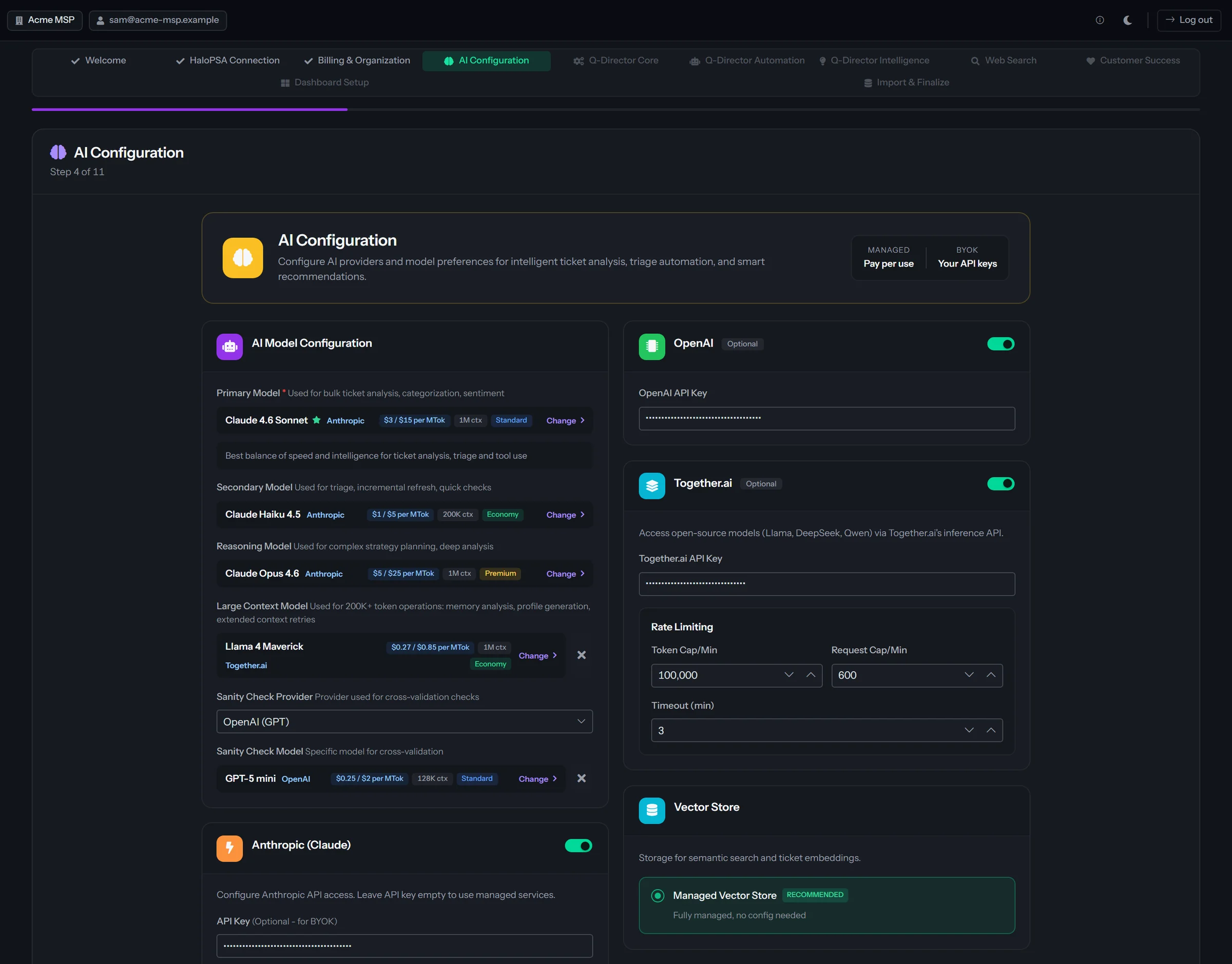
Managed AI runs Anthropic Claude on our account. Or add your own Anthropic, OpenAI or Together AI keys, and your provider bills you directly.
Leave clients and ticket types out
Excluded clients and ticket types are skipped by the automatic analysis, triage and research.
Pause it with one switch
The Processing button in the header pauses automatic AI analysis for the whole instance, after a confirmation. Halo webhooks still arrive; the tickets just aren’t analyzed.
Choose how much history goes in
The first import lets you pick ticket types, clients, teams and a time range, and shows a token and cost estimate before you confirm.
Credentials masked in your docs
When ITGlue, Hudu or SharePoint docs are indexed, common credential patterns become [REDACTED] in the copy the AI reads; the original stays in your database. Docs stay out of AI answers until an admin turns documentation search on.
House rules for Copilot replies
A Copilot reply draft can’t be sent while it contains a banned phrase or is missing a required disclaimer, and the server checks again before it posts.
What data leaves our instance?
Ticket text goes to the AI provider doing each job: Anthropic Claude under our account on Managed AI, or your own Anthropic, OpenAI or Together AI account. Files shared with Qubit go with the question, and when Qubit runs code on Claude, data files are also uploaded to Anthropic’s file storage for the run and deleted after it. Voyage AI turns text into search vectors and reranks results, and the search index sits in a managed vector database in the US, in a partition of its own.
When research checks the web, search terms go to Tavily or to Anthropic’s web search. Slack, Teams, StackJack, MCP servers, your transcription provider and Microsoft Entra ID get what each job needs once you connect them. Errors and logs go to Sentry in the US, and your instance reports health and AI usage to our control plane.
Can we bring our own AI keys?
Yes. Add Anthropic, OpenAI or Together AI keys in the setup wizard or in tenant settings, and your provider bills you directly. Keys are encrypted with AES-256 under your instance’s key. Embeddings (Voyage AI) and the default web search (Tavily) run on our accounts either way. Some jobs, such as Anthropic’s web search, run on Claude by design, and if a model keeps failing, ticket processing moves to a fallback model, usually Claude.
Who can see what?
Inside QuantumOps, each person’s roles decide which dashboards, hubs and admin screens they can open, checked on the server. In the browser extension, the Clock, Call and Approvals tabs, the dispatch board, and the recordings and caller-verification cards follow the same policies, and the ticket, client, user and agent views are open to anyone signed in.
The tabs inside HaloPSA work differently: anyone who can open a tab in your Halo can read it and use its triage and reply controls. Approving a Copilot suggestion needs a technician verified by email code.
Can TechPulse get into our instance?
Yes, when support needs to. TechPulse support can open a time-limited administrator session in your instance, authorized through our control plane, to help with setup and support cases. [TBD: how support sessions are requested, approved and logged]
How do we pause the AI?
Press Processing in the header and confirm. Automatic AI analysis stops for the whole instance until it’s resumed: Halo webhooks are still received, tickets aren’t analyzed, and your primary contact gets an email. To go narrower, exclude clients or ticket types, switch modules off in Module Management, or set a tool to Deny.
Is our ticket data encrypted?
The HaloPSA, AI, Slack, Teams, documentation and tool-server credentials listed on this page are encrypted with AES-256 under a key unique to your instance, and that key is held in Azure Key Vault (documentation keys from the moment the source is next saved or protected in the Documentation Hub). Ticket data is stored in your instance’s own database and isn’t separately encrypted by QuantumOps. [TBD: confirm database encryption at rest on Azure SQL] Traffic to your instance is HTTPS only.
Is QuantumOps SOC 2 certified?
Yes. TechPulse is SOC 2 Type II certified. The details are in our Trust Center, and we’ll walk your reviewer through anything else on a call.
Can we choose where our data is stored?
Not today. QuantumOps is hosted in the United States, on Microsoft Azure, and our privacy policy says data may be transferred to and stored in the US. The region you pick during setup is your HaloPSA hosting region.
Does the AI change tickets on its own?
In a few ways, and each is a setting. Q-Director keeps the Halo category (and the resolution category at closure) current, with a note each time; it is on for new instances and you can switch it off. With call recording, a call matched through a Call Taking session, or by the AI at 90% confidence or more, posts as a call log plus a transcript note hidden from end users, unless you turn auto-post off; other matches wait for a person to post them. With CSAT, each rating posts to the ticket as a note, private by default. Sherlock’s private research note, the guide’s path notes and Guided Work’s ticket colors reach Halo only if you switch them on.
Dispatches, replies, merges and status changes wait for a person, and a tool that changes something asks first unless an admin allows it.
Can you erase one person’s data?
Your ticket data comes from HaloPSA, so erasure starts there. A purge for one client or person, with an audit trail, is built into the upcoming Support Memory Graph, which isn’t switched on for customers yet. For anything else, contact us and we’ll handle the request under our privacy policy.
What does QuantumOps need in HaloPSA?
An API application in your Halo with a client ID and secret, which QuantumOps encrypts, and Halo webhooks signed with your instance’s webhook secret. Changes made from the browser extension go through QuantumOps as each technician’s own linked Halo agent.
[ 11 // start ]
Bring your security questions.
We’ll walk your reviewer through the instance, the keys and the approvals, on a real HaloPSA queue.